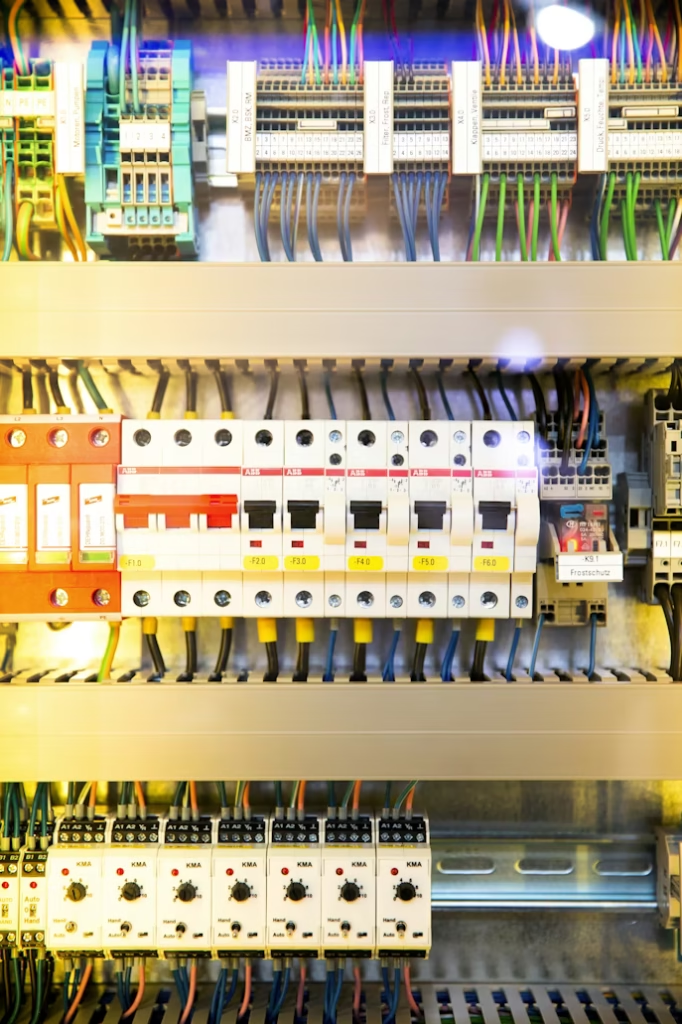
A Motor Control Center, or MCC panel, is one of the most important electrical panels in industrial plants. It is used to control and protect motors, pumps, fans, compressors, conveyors, and other equipment.
Preventive maintenance of MCC panels helps reduce breakdowns, overheating, loose connections, nuisance trips, and unexpected production stoppages.
This checklist provides practical inspection points for maintenance engineers and technicians.
What Is an MCC Panel?
An MCC panel is an electrical assembly that contains motor starter feeders, contactors, overload relays, circuit breakers, control transformers, protection devices, and control wiring.
In industrial plants, MCC panels are commonly used to control multiple motors from one location.
Typical equipment connected to MCC panels includes:
- Pumps
- Fans
- Compressors
- Conveyors
- Blowers
- Mixers
- Hydraulic units
- Cooling systems
- Process machines
Why MCC Preventive Maintenance Is Important
MCC panels operate continuously in industrial environments. Over time, they may be affected by heat, dust, vibration, humidity, loose terminals, and electrical stress.
Without proper maintenance, MCC panels may develop problems such as:
- Loose power connections
- Burnt terminals
- Contactor failure
- Overload relay problems
- Control circuit faults
- Breaker nuisance tripping
- Cable overheating
- Dust accumulation
- Poor ventilation
- Corrosion
Preventive maintenance helps identify these issues before they become major failures.
Safety Before MCC Maintenance
Before starting MCC maintenance, safety must be the first priority.
Follow these steps:
- Obtain the approved work permit
- Inform operation and affected departments
- Identify all incoming power sources
- Isolate the power supply
- Apply lockout/tagout procedure
- Verify absence of voltage
- Discharge stored energy if applicable
- Use proper PPE
- Use insulated tools
- Follow site electrical safety procedures
Never work inside a live MCC panel unless it is specifically approved, justified, and controlled under the site safety procedure.
MCC Panel Preventive Maintenance Checklist
| Inspection Point | What to Check |
|---|---|
| Panel cleanliness | Remove dust, dirt, and foreign materials |
| Ventilation | Check louvers, filters, and cooling fans |
| Power terminals | Check tightness and signs of overheating |
| Control terminals | Check loose wires and damaged ferrules |
| Busbar condition | Check discoloration, corrosion, and overheating |
| Breakers | Inspect physical condition and operation |
| Contactors | Check contact wear, coil condition, and noise |
| Overload relays | Check settings and trip indication |
| Control transformer | Check voltage and overheating |
| Indication lamps | Verify operation |
| Push buttons | Check mechanical operation |
| Selector switches | Check correct function |
| Cable glands | Check tightness and sealing |
| Earthing | Check grounding connections |
| Labels | Check feeder labels and warning signs |
| Drawings | Verify latest electrical drawings are available |
Visual Inspection
Start with a complete visual inspection of the MCC panel.
Look for:
- Burn marks
- Smell of overheating
- Loose components
- Missing covers
- Broken handles
- Damaged cable insulation
- Dust accumulation
- Water ingress
- Corrosion
- Loose labels
- Signs of pests or foreign materials
A good visual inspection can detect many problems before testing begins.
Cleaning the MCC Panel
Dust and dirt can reduce insulation resistance, block ventilation, and increase heating.
Cleaning should be done carefully using approved methods.
Use:
- Dry cloth
- Vacuum cleaner suitable for electrical panels
- Soft brush
- Approved electrical contact cleaner if required
Avoid using compressed air without control, because it may push dust deeper into components.
Checking Power Connections
Loose power connections are a major cause of overheating and panel failure.
Check:
- Incoming cable terminals
- Outgoing motor cable terminals
- Breaker terminals
- Contactor terminals
- Overload relay terminals
- Busbar joints
- Neutral and earth connections
Tightening should be done using the correct torque value if available from the manufacturer.
Checking Contactors
Contactors are critical components in MCC panels.
Inspect:
- Main contact condition
- Coil condition
- Mechanical movement
- Auxiliary contacts
- Signs of overheating
- Abnormal humming noise
- Dust inside contactor body
- Terminal tightness
If contacts are badly worn or pitted, replacement may be required.
Checking Overload Relays
Overload relays protect motors from excessive current.
Check:
- Current setting
- Trip class
- Reset mode
- Trip indication
- Auxiliary contact operation
- Matching with motor nameplate current
- Signs of overheating
Do not increase overload settings without checking actual motor current and motor nameplate data.
Checking Breakers and Fuses
Inspect all breakers and fuses for:
- Physical damage
- Loose mounting
- Correct rating
- Burn marks
- Proper ON/OFF operation
- Abnormal heat
- Correct labeling
If a fuse is blown, investigate the cause before replacement.
Checking Control Circuit
Control circuit problems can cause motor starting failure, nuisance trips, and unsafe operation.
Check:
- Control voltage
- Control transformer output
- Control fuses
- Push buttons
- Selector switches
- Emergency stop circuit
- Interlocks
- Auxiliary contacts
- PLC signals if applicable
Always compare with the latest approved electrical drawing.
Checking Panel Ventilation
Poor ventilation increases component temperature and reduces life.
Check:
- Cooling fans
- Air filters
- Ventilation openings
- Panel internal temperature
- Blocked louvers
- Dust on fan grills
- Nearby heat sources
Replace damaged fans and clean clogged filters.
Thermal Inspection
Thermal imaging is useful for detecting hot spots inside MCC panels.
Common hot spot locations include:
- Cable terminals
- Breaker terminals
- Busbar joints
- Contactor terminals
- Overload relay terminals
- Fuse holders
Thermal inspection is most effective when the panel is under normal load.
Functional Testing
After inspection and cleaning, functional tests may be required.
Check:
- Start and stop operation
- Local and remote control
- Indication lamps
- Running feedback
- Trip feedback
- Emergency stop function
- Interlock operation
- Alarm signals
Testing should be coordinated with operation to avoid unwanted equipment start.
Common MCC Panel Problems
Common problems found during MCC maintenance include:
- Loose terminals
- Burnt contactor contacts
- Incorrect overload setting
- Dust accumulation
- Faulty control fuse
- Weak contactor coil
- Damaged push button
- Faulty selector switch
- Poor labeling
- Missing drawings
- Panel overheating
- Damaged cable insulation
MCC Maintenance Report
A good MCC maintenance report should include:
- Panel name
- Location
- Date of inspection
- Equipment tag numbers
- Work permit number if applicable
- Inspection findings
- Corrective actions
- Spare parts required
- Photos of abnormalities
- Technician name
- Engineer approval
Clear reporting helps track recurring issues and plan corrective maintenance.
Recommended Maintenance Frequency
The maintenance frequency depends on site conditions, load criticality, dust level, temperature, and company procedure.
A common approach is:
| Activity | Suggested Frequency |
|---|---|
| Visual inspection | Monthly |
| Cleaning | Quarterly or semi-annually |
| Terminal tightness check | Semi-annually or annually |
| Thermal inspection | Semi-annually or annually |
| Functional test | During shutdown or planned maintenance |
| Full MCC preventive maintenance | Annually |
The final frequency should follow site standards and manufacturer recommendations.
Safety Notes
MCC panels contain dangerous voltage and high fault current levels.
Always isolate power, apply lockout/tagout, verify absence of voltage, and use proper PPE before maintenance.
Do not bypass protection devices without proper authorization.
Do not restart equipment after maintenance without confirming that all covers are installed and the area is safe.
Conclusion
MCC panel preventive maintenance is essential for reliable industrial operation.
A proper maintenance checklist should include visual inspection, cleaning, terminal checking, contactor inspection, overload relay verification, breaker inspection, control circuit testing, ventilation check, and thermal inspection.
Regular MCC maintenance helps reduce failures, improve safety, and extend the life of electrical components.